



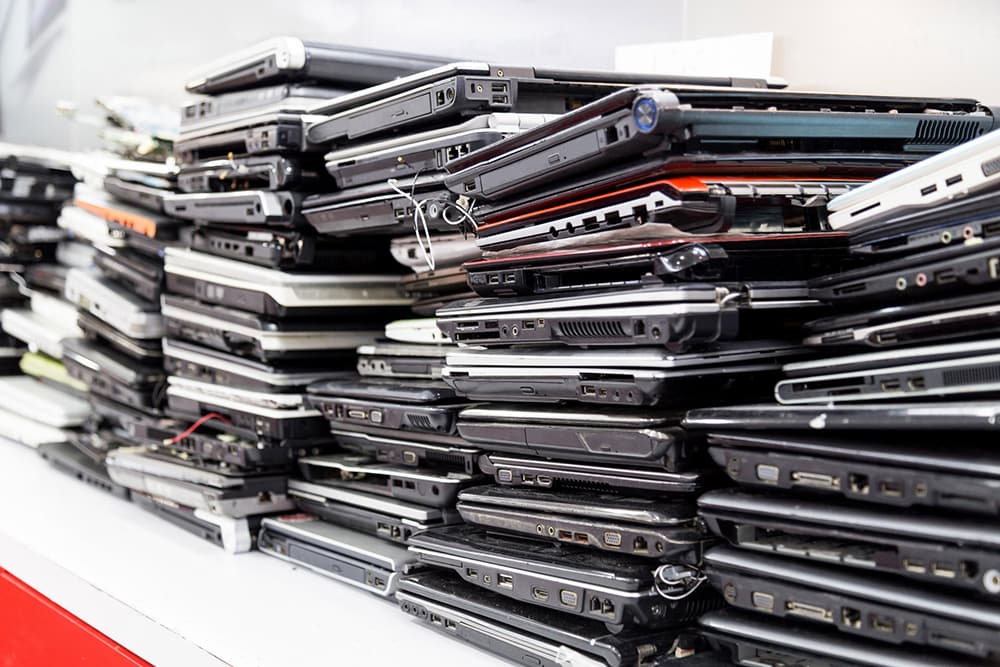
Most offices have one. A cupboard, a corner or a spare desk piled with laptops nobody uses, monitors that stopped working years ago and a tower PC from a previous office move.
It feels harmless. It isn’t.
Those machines still hold data. Client emails, payroll files, saved passwords. They also contain materials that can’t legally go in a normal bin. Get rid of them the wrong way and your business could face a data breach, a fine, or both.
The good news is that doing it properly isn’t complicated. Once you know the rules, the process is simple and repeatable.
This guide explains how to dispose of old computers as a UK business. It covers the WEEE rules that apply to electrical waste, how to deal with the data on your devices, and the practical options for clearing out old IT equipment. By the end, you’ll know exactly what to do with that cupboard and what paperwork to keep afterwards.
Why an Old Computer Isn’t Ordinary Rubbish
What counts as WEEE
WEEE stands for waste electrical and electronic equipment. If it has a plug, a battery or a cable, it almost certainly counts.
For most businesses, that includes:
- Laptops, desktops and servers
- Monitors and screens
- Printers, scanners and photocopiers
- Routers, switches and phones
- Keyboards, cables and chargers
The rule of thumb is simple. Electricals must be kept apart from your general waste. Businesses must store WEEE separately, in a clearly designated area, until it is collected by an approved carrier.
When IT kit becomes hazardous waste
Some items need even more care. Older CRT monitors, equipment containing PCBs and fluorescent lighting are classed as hazardous and need extra handling and documentation.
Batteries matter too. Waste batteries are classified as hazardous waste under UK law, and many laptops still have them inside. If a battery is swollen or damaged, keep it apart and flag it before collection.
The Legal Duties Every Business Has
Duty of care in plain English
Every business that produces waste has a legal “duty of care”. For old IT equipment, it boils down to three things. You must store waste equipment safely, use a registered waste carrier, and keep a waste transfer note when equipment leaves your site.
A waste transfer note is a simple record. It shows what was taken, who took it and where it went. Standard notes must be kept for two years, and hazardous waste records for three.
This is not a box-ticking exercise. Failing to meet the duty of care is an offence, and there is no upper limit on what the courts can fine.
Who pays for recycling
Under WEEE regulations for businesses, the cost often falls on the manufacturer. The producer is usually responsible for the cost of treating and recycling business WEEE, but business users will sometimes have to pay.
The age of the kit makes a difference. Equipment bought before 13 August 2005 is known as ‘historic WEEE’. If you are replacing it, the producer of the new equipment must take the old item if you ask, even if they didn’t make it.
In practice, many businesses find it quicker to book a collection and handle everything in one go, especially when the IT kit sits alongside old desks and chairs.
What digital waste tracking changes
Paper records are on their way out. From 1 October 2026, permitted waste receiving sites in England and Wales must record the waste they receive using a new digital service. Waste carriers, brokers and dealers are due to follow in October 2027.
For most offices, this means one thing. Use a properly registered carrier, because the paper trail is about to become much easier for regulators to check.
Sort the Data Before the Hardware Leaves

This is the step businesses skip most often. It’s also the one that causes the biggest problems.
Why a factory reset isn’t enough
Deleting files or resetting a laptop feels final. It isn’t. Deleting files or restoring a device to factory settings does not count as secure data destruction. Recovery tools can often bring data back.
Under UK GDPR, the risk stays with you. The ICO warns that if personal information in electronic records is not destroyed securely, it may be recoverable and could breach UK GDPR.
Wiping, encrypting or destroying drives
There are three main ways to handle secure data wiping:
- Overwriting. Specialist software writes over the whole drive so the old data can’t be read.
- Encryption. Once the encryption key is removed, the data is no longer accessible.
- Physical destruction. Shredding or crushing the drive itself.
The type of drive matters. Older hard drives (HDDs) respond well to overwriting. Newer solid state drives (SSDs) are trickier. SSDs cannot be overwritten with the same level of certainty as HDDs.
If your data is sensitive, use a specialist data destruction service. Ask for a certificate for each device. The ICO suggests you keep a log of all devices awaiting destruction and store them securely in a locked area with restricted access.
A costly lesson from the NHS
This isn’t a theoretical risk. Brighton and Sussex University Hospitals NHS Trust was fined £325,000 after decommissioned hard drives were sold on eBay. The drives held sensitive patient and staff records.
What went wrong? The ICO found no proper contract was in place with the contractor, and only basic checks were made on the one person who ran it.
The lesson for any business is clear. Check who is handling your kit, and get it in writing.
Your Options for Getting Rid of Old IT Equipment
Once the data is dealt with, you have several routes. Many businesses use more than one.
Return it to the supplier. If you’re buying new equipment, ask whether the supplier will take the old kit back. Some will, though they may charge.
Reuse or donate it. Working laptops can go to charities, schools or refurbishers once they’ve been wiped. It’s the greenest option and good for your local community. Our guide on what to donate covers how to decide what’s worth passing on.
Use a specialist IT disposal firm. For large volumes or highly sensitive data, specialist firms offer data destruction with certificates. Be careful with “free” offers. If the provider isn’t properly licensed, the liability stays with you.
Book a licensed clearance. If old computers are part of a wider clear-out, a licensed waste carrier can remove everything in one visit. Junk Hunters’ office clearance service is WEEE compliant, and every collection includes waste transfer documentation. A two-man team confirms the price on arrival, does all the loading and sweeps up afterwards. Wipe or remove the drives first, then let the team handle the physical removal and recycling.
For regular waste from your premises, commercial waste collection can be set up on an ongoing basis, so old kit never piles up again.
A Quick Checklist Before Collection Day
Knowing how to dispose of old computers is one thing. Having a routine is what keeps you compliant. Before any IT equipment leaves your office:
- List every device, with serial numbers where possible
- Back up anything you still need
- Wipe, encrypt or remove the drives
- Keep devices in a locked room until collection
- Separate damaged batteries and old CRT screens
- Check your collector’s waste carrier registration
- Get and file the waste transfer note
Picture a 20-person office upgrading its laptops. Following this list takes an afternoon. Skipping it could put years of client data at risk.
Clear Out the Kit, Keep the Paperwork, Protect the Data
Getting rid of old IT equipment comes down to three jobs. Keep electricals out of your general waste. Deal with the data before anything leaves the building. Use a registered carrier and keep the paperwork.
Do those three things and you’ve covered the main legal risks. You also make sure the materials inside your old machines get recycled rather than dumped. Only 22.3 per cent of the world’s e-waste was formally collected and recycled in 2022, so every properly handled laptop counts.
With digital waste tracking arriving and data rules as strict as ever, now is a good time to clear that cupboard. When your drives are wiped and your kit is ready to go, get a quote from Junk Hunters. Over 80% of what the team collects is recycled. If you book through JunkApp, you can track your collection live and get £25 off your first booking.